A blog for fans of Bananagrams, word games, puzzles, and amazing things
Showing posts with label online. Show all posts

Friday, November 16, 2012

My addiction to, and subsequent recovery from, Drawception

In my last post, I explained the wonderful sentence-illustrating, drawing-captioning game of Picture Telephone. In the wake of the recent brief popularity of a game for mobile devices called "Draw Something", a lone developer created an online version of Picture Telephone called "Drawception". This is not the first such attempt, having been preceded by such implementations as Broken Picture Telephone and Doodle or Die, but it may be the best.

The first night that I played Drawception, drawing anything using a mouse and the simple controls was a struggle. The resulting drawings were crude. My goal that first night was to unlock the ability to start new games (which allows you to write the initial description that seeds the game). In order to unlock this ability, I had to first earn ten points.

While Picture Telephone is a purely cooperative game, Drawception has some competitive aspects, since players earn points when other players vote for their panel. Once the game has reached its pre-designated panel limit (typically 12 or 15 panels at present), the participants, and often other players, read through the game and have the opportunity to click a little upward-pointing thumb symbol on any panel that they want to give points to. Such voting is anonymous and has no direct benefit to the player, except that it lets them express approval and have some influence on what is considered "good" in the Drawception culture.

Many of the drawings from my first night earned zero points, but some earned a few, like my depiction of the description "Rubber ducky, you're the one":

The next morning, enough of the games that I had played in had finished that I had earned the privilege to start my own first game. This is how it turned out:

I was hooked.

This went on to become the top game for the day (where top games are determined by how many people "favorite" it).

As I got better at the game, technical aspects of the game were also being improved. Bugs that slowed down the drawing process and made the results look worse were fixed. Previously you could accidentally paint over minutes of detailed work with one false swing of the cursor; a new Undo button rectified this, expanding the horizon of what could be drawn in ten minutes. Sites of this kind are frequently plagued by trolls who draw offensive panels and try to disrupt games, and one of the biggest successes of the Drawception developer has been implementing a system that mostly negates the effects of such trolling by filtering out or hiding such panels (though there is still enough potentially objectionable material that does not get flagged by the community that children and the easily offended should still not play).

There was a satisfaction that came with contributing panels to ten or twelve games in a night: it felt like an investment because I knew that the next day, I would be getting some funny or entertaining finished games as a result.

One of the highs that I got from playing Drawception was the feeling that, within that small drawing box, I could draw anything. Not just anything that might appear as a Drawception description, but anything that I could conceive of.

The feeling of possibility led me to experiments such as starting games with a particular phrase, just to see what one person's imagination and drawing skill could do with it. If that first drawing then spawned a great game, I viewed it merely as a bonus. When I spotted this kind of description in the pool of possible drawing prompts (and yes, it is possible to develop a sense for which descriptions are the initial descriptions for a game), if I felt that I could do the description justice, I found it satisfying to produce for the game creator a drawing that would make them happy. So, for instance, when I encountered the description "Richard Feynman plays the bongos", I realized that since I knew who Feynman was, I might be the best person playing at that moment to attempt to give it a shot. I found a Google Images result showing Feynman playing bongos to use as a guide and did my best to convey it, but as time was running out, I notice that it was not sufficiently obvious who the bongo player was supposed to be. Then, in a moment of inspiration, I realized that he should be thinking about physics while playing (as this seemed like a very Feynmanesque thing to do), so I drew a thought bubble and put a Feynman diagram inside it.

That my Feynman was subsequently mistaken for Elvis did not bother me. The player who had started the game was pleased and left me a positive comment, which made me smile.

At the peak of my Drawception addiction, I wondered how long it would go on and imagined that it could be part of my daily life indefinitely.

As I become habituated to the initial wonder of Drawception, many of the next hundred games began to seem pedestrian. The games where the same picture and phrase got repeated for most of the 12 or 15 panels, with artwork that was not particularly striking, became old after a while. I yearned for more novelty.

The more common a reference or idea is, the more likely it is for the person writing or drawing the next panel to correctly interpret it. Consequently, it is generally the most widely known references and characters that manage to propagate without distortion across multiple panels. This leads to the majority of games involving pop culture references or Internet "memes" at some point. If you play enough Drawception, you will likely see a lot of whoever the popular characters are at the moment (Batman or Spider-Man or Worf) and you will learn to identify others (such as Trogdor and Nyan Cat and Chthulu and various anime characters).

From this active tide pool of Internet culture emerged a new lifeform: Trouble Muffin. It started out as an in-joke between two friends who played Drawception and created games about someone named "Trouble Muffin". Soon, other players wanted to participate. Trouble Muffin evolved into a muffin with an eye patch and a tough-guy persona. Those who did not recognize him when playing Drawception typically described him as a cupcake or a pirate muffin, but as his fame grew, he became an icon of Drawception. At the peak of his popularity, most of the top games were about Trouble Muffin and his many adventures.

The fun I had watching and participating in the development of Trouble Muffin helped me understand why people can be so enthusiastic about such Internet memes; it's just different when you are on the inside.

Since Drawception is played all around the world, little bits of the language and culture of other countries can manifest during the process of repeated translation between language and pictures. British English has a major presence on Drawception, so if you play long enough you will see police officers described as "bobbies", panties described as "knickers", mathematics called "maths", redheads called "gingers" (though according to this BBC article, the use of the phrase "ginger hair" in American English is growing because "ginger" appeared in Harry Potter books published in the U.S., even though there was an attempt to remove all the British English), and cookies called "biscuits". None of that prepared me for what happened when what appeared to be a speaker of British English encountered a picture of Cookie Monster:

I'm pretty sure that Sesame Street characters are fairly well recognized all over the world, but obviously not quite as well as Robocop is... At least he wasn't referred to as "Biscuit Monster".

As I continued to play, I became more selective in what descriptions I would draw. Only things that I had never drawn before, only descriptions that were inspiring. Sometimes I would skip descriptions for half an hour without finding anything I wanted to draw.

Toward the end, changes to the way the game worked by the developer tended to detract from my enjoyment of the game. Too many games were stuck in the queue, causing games to take days to complete. The blame was placed on descriptions that no one wanted to draw (typically because they were too difficult to draw or to understand). The developer dubbed these "dustcatchers" and decided that whenever a description panel had been skipped by too many players, it would be rejected, and the game would be backed up to the previous panel, which would be reinserted into the pool of available drawings to describe. My first two descriptions after this change were both rejected. I basically stopped playing at that point, feeling that the game was being dumbed down (as recently finished games suggested). The dustcatcher sensitivity was set too high initially, and while this was only a temporary state (I believe the developer must have started silently adjusting it (maybe even the next day)), my addiction to Drawception was finally broken.

It would be easy to say that I am done playing Drawception, that I have lived through a 15-panel pseudo-narrative arc and that my days of playing Drawception are over. But I still check in on the game periodically, and whenever the developer introduces new features, I play with them for a while. Mainly, I prefer to just start games now. It requires very little time and can sometimes yield cool results. And it is ultimately the privilege that motivated me to start playing in the very beginning.

Playing Drawception was a great experience. I got to draw a lot, which is something I enjoy. I honed my ability to paint tiny pictures using a trackpad to levels that didn't initially seem possible. I created popular games and panels. I enjoyed the challenge of trying to read the mind of the player who had drawn a particular panel, to try to come up with the most correct (or most amusing) description of it. And I participated in and enjoyed lots of hilarious and creative games with a good group of players.

The game has now entered a monetization stage, so the nature of the game, and the community around the game, are continuing to change, but there are enough good things about the game that I think I can still recommend Drawception to anyone who wants to try something new.


Friday, May 18, 2012

The power of recursive drawing

An MIT student has released a simple CoffeeScript/JavaScript-based tool for creating recursive drawings - combinations of rectangles and ellipses that can have a fractal-like structure. It is available at RecursiveDrawing.com. This video briefly explains and demonstrates how the tool works: Essentially, you can:
  1. Drag shapes into the canvas area.
  2. Move a shape around by clicking on its center and dragging.
  3. Resize a shape by clicking on its edge and dragging in and out with respect to the center.
  4. Rotate a shape by clicking on it edge and dragging sideways.
  5. Change the aspect ratio of a shape by clicking on its edge and dragging while holding the SHIFT key.
  6. Move around on the canvas by clicking and dragging the canvas.
  7. Zoom in and out by scrolling on a mouse or trackpad.
You can make more drawings by clicking on the "+" button in the sidebar, and shift between them by clicking on them. And then, by dragging the little representation of the canvas in the sidebar into the main canvas, you get the magical recursive effect.
I found it very easy to form a close approximation to a golden rectangle, subdivided into squares...
...or this spiral of home-plate-like pentagons:
I then made a pretty cool fractal tree:
Every time I play with this tool, I make something even better.
The interface is intuitive and powerful, making it terrific fun to play with. I would like to see a triangular shape, some control over color, and perhaps some kind of symmetry operator to allow flipping and reflecting of drawings. And since the source code is available, maybe someone will eventually add these features...

Friday, May 11, 2012

Lexcavator: A cool word-exploding arcade game

A great new arcade-like word game has just been released for desktop computers. It's called Lexcavator, a name that evokes the idea of digging for words. In this game, you tunnel down through a bottomless grid of letters by forming words Boggle-style. Then you jump your little avatar (represented by the "@" symbol) around in the various tunnels that you create, as you try to avoid being pushed up to the top of the screen by the constantly rising letter grid.
The game feels like a hybrid of Boggle and an inverted Tetris. Once you get used to using the mouse to click and drag through letters to form words and navigating with the keyboard, the interface becomes quite intuitive. There are power-ups in the form of other symbols: "!" creates a deep one-column-wide vertical shaft, ">" clears all the letters in the row that it is sitting on, "_" destroys a random set of tiles, "?" randomizes all the letters, and "*" takes out all letters in a 5-by-5 grid.
You don't necessarily need to activate the power-ups when you uncover them. I find that using the "?" power-up usually causes the resulting letters to be harder to make words out of. You also have the option of delaying usage of a power-up by guiding it down with you: for instance, standing next to the power-up and excavating under both yourself and it works nicely.

Once you finish a game, you get a report of various statistics about your performance. If you enable the "Internet" option in the Settings, the game will also report your scores to the central server and tell you how well you did compared to other players...

and what words you were the first in the world to find:
As of today, only 2% of the words on the word list had been found, according to the Lexcavator Twitter account. According to the developer's blog, the leaderboard is completely anonymous, so you don't have to worry about generating a login or a password or recovering a password when you've forgotten it. It's simple and done the right way, just like everything else about the game.

This is the kind of game that you will find yourself wanting to play repeatedly. There is also a Quest Mode which consists of a series of untimed challenges (like, find four 4-letter words, all in lines, without finding any other words).

You can get the game at lexcavator.com. It is being distributed on a pay-what-you-want model. I initially downloaded it for free, but I'm going to go back and pay for a copy to support the developer.

Wednesday, January 18, 2012

Group read-through of "Gödel, Escher, Bach"

Every few decades an unknown author brings out a book of such depth, clarity, range, wit, beauty and originality that it is recognized at once as a major literary event. [This] is such a work.

- Martin Gardner
One summer, long ago, I read the first half of an amazing book called Gödel, Escher, Bach: An Eternal Golden Braid, but then I had to return it to the library, and I never found the time to finish it.

Now I've discovered that a group read-through of "Gödel, Escher, Bach" is being organized through Reddit. It's being run by Rob Speer who has previously taught seminars on this book (and who has read it five times!).

What makes it amazing? It discusses Escher's art, Bach's music, and Gödel's mathematics and ties them all together. It's got puzzles and paradoxes and ponderings about the nature of consciousness. And it is terribly fun. It has a whimsical style evidenced by its wordplay and humor. The author incorporated a wonderful dialogue written by Lewis Carroll called "What the Tortoise Said to Achilles" in which the Tortoise and Achilles have a discussion which illustrates a paradox of logical inference.

Here is how it begins:
Achilles had overtaken the Tortoise, and had seated himself comfortably on its back.

"So you've got to the end of our race-course?" said the Tortoise. "Even though it does consist of an infinite series of distances? I thought some wiseacre or another had proved that the thing couldn't be done?"

"It can be done," said Achilles; "It has been done! Solvitur ambulando. You see, the distances were constantly diminishing; and so—"

"But if they had been constantly increasing?" the Tortoise interrupted. "How then?"

"Then I shouldn't be here," Achilles modestly replied; "and you would have got several times round the world, by this time!"

"You flatter me—flatten, I mean," said the Tortoise; "for you are a heavy weight, and no mistake! Well now, would you like to hear of a race-course, that most people fancy they can get to the end of in two or three steps, while it really consists of an infinite number of distances, each one longer than the previous one?"

"Very much indeed!" said the Grecian warrior, as he drew from his helmet (few Grecian warriors possessed pockets in those days) an enormous note-book and a pencil. "Proceed! And speak slowly, please. Short-hand isn't invented yet!"
He then wrote similar dialogues with the Tortoise and Achilles and other characters to accompany and introduce each of the book's chapters. And these are just a fraction of the things that make this book so great!


The plan is to read the book slowly, over six months (from January to July of 2012), so even if you start a little late, there's plenty of time to catch up. Rob will post insights and discussion threads in the group forum at http://reddit.com/r/GEB.

It is a challenging book, but a rewarding one. If you have ever thought about trying to read it, this is a great opportunity to follow through.

Wednesday, June 8, 2011

Review of the new version of WordSquared

The brand new version of Word2 is now out. It comes with a different design (lots of wood grain and most squares on the board are off-white) and a host of different rules which definitely change the game.
One of the problems with the original version of WordSquared is that once you developed a big enough word structure, you could always find a place to put almost any letter. Consequently I quickly stopped needing the "Swap Tiles" option, and so accumulating lives (by building on the stars dispersed around the board) became irrelevant.

The new version solves this by no longer giving you blanks for free. You start off with three, and then if you want more, you have to buy them. (Five stars buy one blank tile, and swapping your seven tiles for a new rack now costs twenty stars.) Word formation is consequently more challenging. Your rack now consists of seven non-blank tiles and one slot for an arbitrary number of blanks.

Stars are acquired in a variety of ways. Stars are granted for logging in once a day and for achieving certain score benchmarks (called "Levels"). Stars may also be acquired by building a word over a square with a star on it. While you will often get just 1 star for building over a Star Square, occasionally you will get more. I've gotten 2 stars in a couple of instances and 3 stars once. (When beta-testing, I once got 8 stars.) Since the number of stars dispensed is random, this is an example of operant conditioning: varying the reward (as when training an animal) results in more rapid acquisition of the skill being trained for. In Word2, randomizing the reward should make you crave the stars more...

A new feature called "teleporting" is supposed to solve the problem of players being boxed in. On the one hand, it takes away the perpetual threat that you are going to be trapped somewhere if you don't check in with the game frequently enough. But on the other hand, such fear is really not a good way to motivate players. We ought to play games because they are fun, not to prevent others from building impenetrable double-walled word structures around us.

The new version also alters the tile values and tile distribution from the Scrabble parameters, based upon how Word2 players have played in the past.
The vowels are all still worth 1 point, except for the U which is two (logically, as the U is the hardest vowel to use). A Y is worth 5 points.

This table compares Scrabble tile values with those for WordSquared:

ABCDEFGHIJKLMNOPQRSTUVWXYZ
Scrabble1332142418513113101111448410
Word21543154419624214102112558510

There are a number of interface changes:
  • When you play a blank, instead of having to type in the letter you want to play, you are presented with a complete alphabet of tiles from which you may choose by clicking.
  • Placemarks are placed, not by double-clicking, but by dragging a placemark icon from the bottom of the placemark list.
  • For now at least, your word history is hidden in your profile, which you can get to by clicking on your avatar icon.
The best change is the new transition between the full map and the mini-map which is now a smooth animation, making it easier to maintain a sense of where you are in the WordSquared world.

This new version of Word2 breaks with the Scrabble rules and model in favor of making Word2 a better massively multiplayer game. The creators seem full of ideas, and I am interested to see what they do next.


Further clicking:

Wednesday, March 23, 2011

Guess My Word - a fun word-guessing game

Important notice: This post is about an online game that no longer exists at the linked URL, but you can find the same game (now maintained by someone else here.
Imagine if you were trying to play Twenty Questions but weren't allowed to ask about the meaning of the word, only its position in the dictionary. Well somebody else imagined it first, wrote it up, and put it online.

It's called "Guess my word!", and each day there is a new word to guess.

You start by making some initial guess about where the word might be in the alphabet:


You find out where the word is with respect to your guesses (with the closest words being highlighted in blue and red (indicating before and after, respectively)):


And after a number of guesses, eventually you should converge on the word:


...after which you can enter your name to appear on the leaderboard and check out other people's times and guesses. It's a good way to work on your active vocabulary when you are not playing Bananagrams...

You can play Guess My Word by clicking here. If you really like it, there are now two separate words you can play each day. Plus there is a new iPhone app called Lexicographer which is a little different, and for which I have written a separate review.

The best thing about this game is that you can also easily play it offline as a two-person game. You can take turns thinking of the secret word and guessing, and since this can be played without pen and paper (as long as you can remember the two current bounding words), it makes a great game to play in the car.


Further reading:

Thursday, January 27, 2011

WordSquared update

The WordSquared team has been busy. After reprogramming their massively mutliplayer Scrabble game (previously reviewed here) to be faster and more responsive, they've rolled out a blog and more site improvements:
  • There is now a real login system, giving you the option to either assign a password to your existing WordSquared username or link your Word2 game to one of a number of other accounts (Google, Twitter, Facebook, AIM, Yahoo, or OpenID). Which means no more worrying about losing your game due to site upgrades. And your game is no longer tied to a particular browser via cookies, so you can log in anywhere and play.
  • The game now tracks and displays statistics about your games, like the longest word that you have formed (longest since statistics started, that is).
  • Whenever you lay down a word, the resulting score (or scores, when you form multiple words) appear on the screen at the location of the word and float gently upward before disappearing. It's a nice, elegant effect. (This turns out to be the way HTML5 browsers display word scores. Current Firefox versions (>3.6.9 but <4.0) do not have any HTML5 capability built in, not even as an option, so I prefer Safari for Word2.)
  • WordSquared now has achievements that you can earn. Some are based on the number of words that you have formed, but I knew right away which one I wanted to get:

    I also picked up this one:

    Getting a rack of Is was pretty easy, but to get to the T Party, I had to unload one last J. It can be tricky to find a place to dump a J. I wound up scrolling way back along the path of words that I have made, trying to find an AM or OUST or OWL or an UMP or a UKE. (This is where it would be nice to have a search function to let me jump to particular words I've already formed). Eventually I found an unobstructed INN and went with JINN. Which seems like an appropriate way to get to the T Party, as I can totally imagine Mr. T playing a genie.

    Achievements are not retroactive, so you get to earn them all (even easy ones like "Get a rack with no vowels") for the first time.

    The achievements stay on your screen until you dismiss them, so you can continue playing with the cartoon Mr. T overlapping your board as long as you like, pitying your foolish moves.
  • And finally, while it's not a new feature, I just discovered that since WordSquared is an HTML5 game, it is possible to zoom in and out just by changing the font size. This is really cool and often preferable to scrolling the board since it can be done quickly with a keystroke.

Also, Word2 now produces sound effects when you lay down tiles and score points. You can toggle them on or off with the speaker icon in the lower right.

The Word2 coders have formed a company called Massively Fun, and their site says that Word2 is to be just the first of their games. Good luck guys!


Further reading:

Thursday, November 18, 2010

Meet Kigonagrams: Bananagrammy thing & online haiku toy

The simple, elegant design of Bananagrams tiles lends them to a wide range of activities. They are perfect for rapidly sliding around a table as you race to build words faster than your opponents in a frenzy of QATs and JETs and ZOOs. And they are also perfect for less focused, more creative play, like building little Bananagrams sculptures or composing Bananagrams poetry.

It was this last activity that inspired a design student named Fred Truman to program an online environment for rearranging letter tiles into haikus. It's called Kigonagrams, a name that Truman explains as
the combination of anagrams (or obviously bananagrams) and kigo, which are words or phrases associated with a particular season used in Japanese poetry.
Kigonagrams starts off by giving you a randomly selected haiku, like this: And then it sets you loose to play with the tiles, so you can make something like this:
The controls for resetting the tiles to their original positions and requesting a new set of tiles are way at the bottom of the page.

The grayed-out "tweet your haiku @kigonagrams" is an encouragement, but also an indication of a possible future feature.

The most fun part for me was dragging one tile into others and watching as a bunch of tiles got pushed out of position. This kind of physics modelling is a feature that would be cool to see in other online word games someday.


Further reading:

Wednesday, November 3, 2010

Totally Unofficial WordSquared/Scrabb.ly FAQ

The massively multiplayer word formation online game formerly known as Scrabb.ly is now called WordSquared. I previously posted an introduction to Scrabb.ly/WordSquared and then some more tips. I'm posting this unofficial FAQ to answer any other questions that crop up. The world of WordSquared is evolving rapidly, so this information may become dated fast!

How can I find my words when I've wandered away from them?

Click on the home icon in the upper-left hand corner of the minimap and you will jump to the last word you made. Or click on your avatar icon (next to your username) which will pull up your profile which includes the words in your history (underneath your score) and you can jump to any of those positions by clicking on the words. Or check whether you have previously set any placemarks that can take you back to your words.

If none of these methods work, your words are basically lost, and your only recourse is to search for them, which could take a ridiculously long time. The official advice in these situations is to set placemarks, so you can reorient yourself in the future.

If my words are surrounded by others, how can I escape?

a) You can use the new teleport option. This allows you to move to anywhere else on the map and start building off of someone else's tiles (or your own). You can teleport once every 24 hours for free. If you want to teleport again within 24 hours, it costs 100 stars(!!!).

b) If you prefer to do it the old-school way, read about the breakout method.

Which words can I play in WordSquared?

Any word which is on the TWL06 (the Scrabble Tournament Word List for the U.S., Canada, and Thailand) is WordSquared-legal. There are 178,691 words in the TWL, and the longest possible words are 15 letters long (for now).

I've seen words in Word2 which are unconnected to anything else. How were they made?

These islands formed in December 2010 when the WordSquared code briefly had a bug which allowed players (just new players, I think) to build words not connected to any other words.


How can I keep track of locations on the WordSquared map?

Use the new built-in Placemarks. The interface is visible when the map is expanded to fit your whole browser window.

What does the entire WordSquared world look like?

Courtesy of Aaron Parecki's Flickr photo, on September 5th, the Scrabb.ly map looked like this: It's way more complex now. You can see a time-lapse animation of the growth of the Scrabb.ly world here.

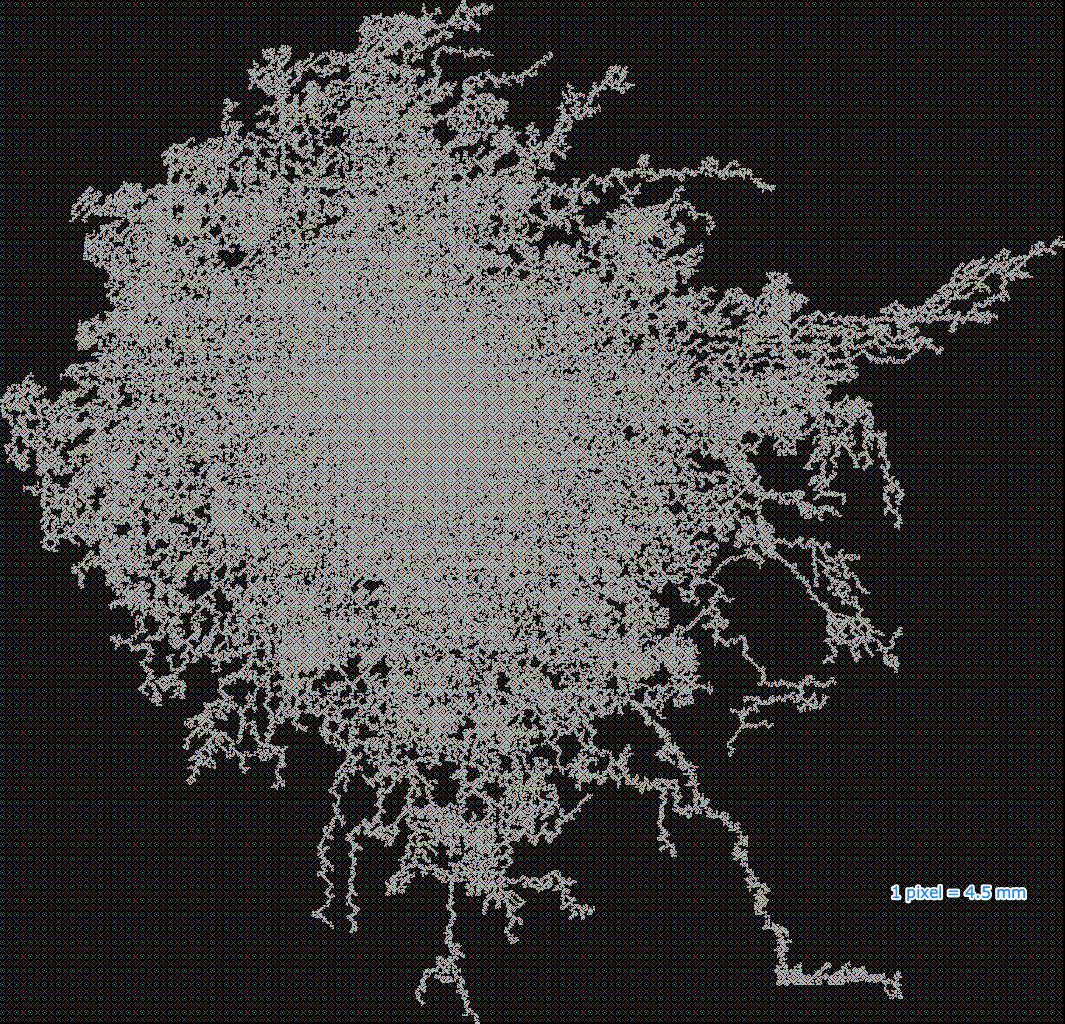
In February 2011, /dev/joe made an amazing world map for WordSquared.

In November 2011, DoctorPeaks posted to Twitter a link to this zoomed-out version of the WordSquared map:

Another WordSquared map courtesy of DoctorPeaks, capture on November 23, 2013, about one week before WordSquared shut down.
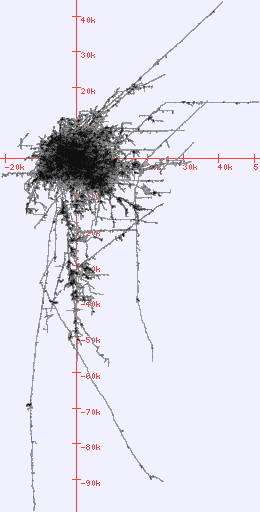
I made a chart of the tile count of the entire board as a function of time, based on numbers from the official WordSquared Twitter account and blog:

A zoomed-out plot showing the last known tile count for the WordSquared world:

The 42.2 million tiles played in Word^2 as of March 10th, 2011 made 14.86 million words.

As of January 26, 2012, 63 million words had been played, corresponding to 141 million tiles. (If the tiles-to-words ratio had held at 2.8 tiles per new word, it would have corresponded to 179 million tiles. Instead it fell to 2.2 tiles/(new word). It may make sense for this number to decrease as the number of words increase and word chains lengthen, as there are increasingly more places that people can easily build short words. I'll have to think about this.)

The last tally I am aware of was shortly before WordSquared was closed for good. As of about November 22, 2013, 1,543,257 players had played 264,768,058 tiles, forming 123,148,431 words (2.15 tiles/(new word)).

Outdated questions:

What is the deal with the new version of WordSquared?

It's live! Here is my review.

You can still sign up to be a beta tester for new features by clicking here.

Blanks don't work. What's the deal?

This question is now kind of irrelevant since blanks now have to be bought.
There is a bug that is affecting older browsers. A browser that supports HTML5 fully should allow you to use blanks. Otherwise, just swap tiles when you get too many blanks.


I lost my game in the switchover from scrabb.ly to wordsquared.com. What do I do?

First, visit http://scrabb.ly. Your browser should then forward you back to wordsquared.com, but with your scrabb.ly cookies duplicated over to restore your game. If your score and username and tiles show up in WordSquared, but you can't find the words that you made, try clicking on the new home button in the upper left hand corner of the minimap:


That should take you back to the last word you made. If that doesn't work, try reading about tracking locations.


How do I end the game so I can start over in a new spot?

Since the teleportation feature means you can never really get stuck, your game never ends. You can just pick up and move to a different spot.
Either delete your wordsquared.com cookies or log out.


How can I keep track of locations on the WordSquared map?

Old answer (retained for backward compatibility with old posts):
If you look through the cookies that your web browser has stored (generally buried in the web browser preferences, under some heading like "Privacy" or "Security"), you will find a few cookies set by wordsquared.com. One is called "grid_origin" (it was called "gridOrigin" in previous versions). It looks something like this: [wordsquared.com browser cookies] The two numbers (separated by "%2C") are coordinates in columns and then rows. A grid_origin of 1992%2C-1202 should be read as (1992,-1202) and means that WordSquared is currently set to look at a position 1992 columns to the right and 1202 rows up from some reference point. (The reference point (0,0) is an area where the tiles are very dense and is almost certainly where the first WordSquared word was played.)

If you open up WordSquared in your browser, drag the map to a new position, and then recheck the cookies, you will find that the grid_origin value has changed. (Note that you now have to drag the map instead of the board in order to update the grid_origin cookie. Dragging just the board will update the worldOffset cookie. It may be a better reference, but those numbers are horribly long!)

If you lost your position in the switchover from scrabb.ly to wordsquared.com, you can just look at your grid_origin cookie for scrabb.ly and then drag the board in wordsquared.com until you get the WordSquared grid_origin cookie close to matching the scrabb.ly grid_origin coordinates. Then (like magic!) you will be back where you were when last playing Scrabb.ly.


If you want more official answers to your questions, you can get in touch with the WordSquared team, either through their customer service site or their Twitter account or by mailing support at [the name of the site for the game]. WordSquared now also has a blog!

[Last updated,February 2014]


Further reading:

Friday, October 22, 2010

Advanced Scrabb.ly/WordSquared techniques

I recently posted an introduction to Scrabb.ly (now called WordSquared). Since then, I have still been playing, loading up Scrabb.ly from time to time and extending my original chain of words. Here are a few survival tips that I have learned:

When you see other players encroaching, run away! It's pretty easy to just keep forming words on a grid with open space. You can generally find some place in your grid to fit nearly any letter, and in the worst case, you can hit "swap tiles" and start off with a new set of letters. The biggest threat to your survival is being boxed in by other players (but see below about how to deal with that).

Start in a relatively empty part of the board. New players will be randomly placed near recent activity, but you don't really want to be within sight of another player. They might perceive you as a threat and try to box you in. It's better to backtrack from the front a little and find a quiet place where you can start building on your own. That way you can get your bearings and build up a big enough grid that you can always find some place to dump letters.

To be sure that your part of the board is open, keep in mind that...
The map is not the territory. Currently, the little map up in the left hand corner (which can be expanded by clicking on the box with the arrows in it) is not up to date. It seems like it is updated maybe once a day (if that). Note that this is likely to change in the future, as the site is improved. For now, it means that if you want to scope out the competition, you have to drag around the board (which can also be done by dragging on the map) to see where the tiles actually are.... [OK, the map updates more quickly now, at least for a player's own tiles which appear in a chunkier white trail dynamically added as another layer over the main map]. In addition to checking out the big version of the map from time to time, it also helps to keep an eye on the little expanding circles that appear on the map whenever someone plays a word.

It is possible to break out when surrounded! This technique was written up by SPAZIN who is currently third on the leaderboard (for human players). He explained his technique here. (You can tell he is an expert from how concisely he explains it). I thought it would benefit from a bit more description, so I decided to expand on it a little below.

Step 1: Identify a place to break through:

Here I decided that I could build to the left through another player's DEN to make a word like INDENT.

Step 2: Build over in that direction.


Step 3: Plan your approach.

At this point I was close enough to map out a specific path. I imagined hanging an O off of the S to make SO, and then constructing a three-letter word like AGO from that O, and finally a three-letter word like SEA, where the S would form the end of the eventual word INDENTS.


I then had to go off to some other part of my grid to dump a lot of letters before I got the tiles I needed to make INDENTS.

Step 4: Break out.
Before:

After:
Note that the DEN tiles now have dark letters, indicating that I now have a partial claim to them. I believe this means that I could build off of any of them, even if none of my original tiles are involved.

Step 5: Run away!

You can now escape the blockade and continuing playing Scrabb.ly as usual.

Have fun!


Further reading:

Saturday, October 16, 2010

Scrabb.ly/WordSquared - Massively Multiplayer Online Word-formation Game

The biggest word game ever is slowly growing still bigger over at Scrabb.ly (recently renamed "WordSquared"). Created by four programmers over 48 hours for a competition, it's effectively an infinite grid (though currently limited to a giant square with each side being about 200 million tiles long) on which people all over the Internet are simultaneously laying down tiles to build words. You can play it in most recent web browsers at http://wordsquared.com.


For your first move, you can build a word (using a subset of your seven available tiles) off of any available tile on the board. For all subsequent moves, you need to build off of your own words.

Scoring is like in Scrabble. The tiles have values on them, and the grid has been formed by putting a bunch of Scrabble boards together, overlapping the rows and columns on the edges, so that the triple word score squares are shared with the neighboring boards.

Additionally, you have a certain number of available "lives" like in a video game. If you swap out your rack for new letters, you lose a life. If you form a word that overlaps one of those bonus squares in the center (the ones with the star on them), you gain a new life.

Probably my favorite part about this game is exploring the map of the grid. A lot of the overall structure of the interlocking words looks rather organic, but there are a few places on the grid where someone (possibly automated scripts) have constructed long staircases of two-letter words or other regular structures.


One downside is that the site is a bit slow to load, and even just when I switch over to the browser tab that has Scrabb.ly in it, the browser hangs for a while. Every time you enter a word, the game takes several seconds to update and give you your new letters. [This is no longer an issue, as the updated version of the game is much faster.] Also, the large scale map seems to be updated very infrequently (maybe every few hours or once a day), so by exploring the apparent frontier (by switching back from the map view to the zoomed-in grid view), you will find that there may be words several board lengths beyond where the map suggests they will be.

If you stop playing and come back later, your previous position on the map and tiles should be restored, assuming you are using the same web browser... Player identification is done through cookies. "Claiming" your words by adding a username (or Twitter username (preceded by the "@" symbol)), just makes public your position on the high scores list... it does not enable you to set a password or log in from another computer or browser. I would guess that this will be changed in Scrabb.ly 2.0. If you are lost on the board, you can find your words by clicking on them in the word history bar on the right hand side.

The game is still a bit buggy. If it gets confused about what tiles you have or anything else, you can always reload the page in your browser. And I have found that the blanks can never be used to form words in all but the most recent browser versions. If I try to use them, I get prompted to enter what letter they represent, but then the word never gets accepted. There were reports that blanks would be accepted if used as the final letter in a word, but that's not working for me either. Basically, I save up blanks until my rack becomes unusable and then hit the "Swap Tiles" button.

One other caution about this game: It can be kind of addictive.

If you want a lot more Scrabb.ly information, you can watch this YouTube video of one of the Scrabb.ly programmers giving a talk about the game. There are some fairly technical details between about minutes 5 and 10, but most of the rest of the talk is pretty accessible.

The designers have apparently considered making a similar gigantic chess or checkers game (with appropriate rule modifications) or giving some classic 8-bit Atari games the Scrabb.ly treatment. A planned Scrabb.ly 2.0 will have some social features and additional new game mechanics. They might also incorporate play in foreign languages, but still on the same grid as the original game, though possibly starting each language in a different sector of the board, just for the fun of watching what would happen when two language grids collide.


Further reading: